
How to Add Sticky Widget or Floating Sidebar in WordPress

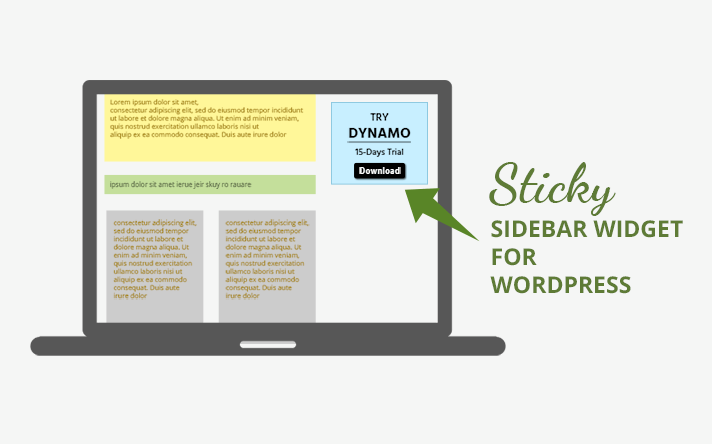
Want to add a sticky widget or floating sidebar in WordPress so important content stays visible while users scroll?
A sticky sidebar is one of the most effective ways to:
- Increase click-through rate (CTR)
- Boost email subscriptions
- Promote products or offers
- Improve conversions
- Keep high-value content visible
Instead of disappearing as visitors scroll, a sticky widget stays fixed on the screen, keeping your call-to-action in constant view.
In this guide, you’ll learn two easy ways to create a sticky sidebar in WordPress — using both a free and a premium plugin.
Why Use a Sticky Sidebar in WordPress?
Your sidebar may contain secondary content, but it’s one of the most valuable conversion areas on your website.
When optimized correctly, a floating sidebar can help you:
- Grow your email list
- Promote affiliate offers
- Highlight popular posts
- Display ads effectively
- Increase engagement on social media
- Improve overall user experience
Because the content stays visible during scrolling, it naturally attracts more attention — leading to higher conversions.
2 Best Ways to Add a Sticky Sidebar in WordPress
Below are two popular and reliable WordPress plugins that let you easily create a floating sidebar.
1. Q2W3 Fixed Widget (Free)
If you’re looking for a simple and lightweight solution, Q2W3 Fixed Widget is an excellent free option.
What This Plugin Does
It allows you to fix any widget in your sidebar, making it stay visible while users scroll up or down the page.
How to Use It
- Install and activate the plugin.
- Go to Appearance → Widgets.
- Open any widget.
- Check the “Fixed widget” checkbox.
- Save changes.
That’s it — your widget will now float while scrolling.

Key Features
- 100% free
- No complex setup required
- Fix multiple widgets
- Works with most WordPress themes
- Optional mobile disable feature
- Footer overlap protection
Important Tip: Prevent Footer Overlapping
If your footer contains large sections (links, videos, posts, etc.), a sticky widget might overlap it.
To fix this:
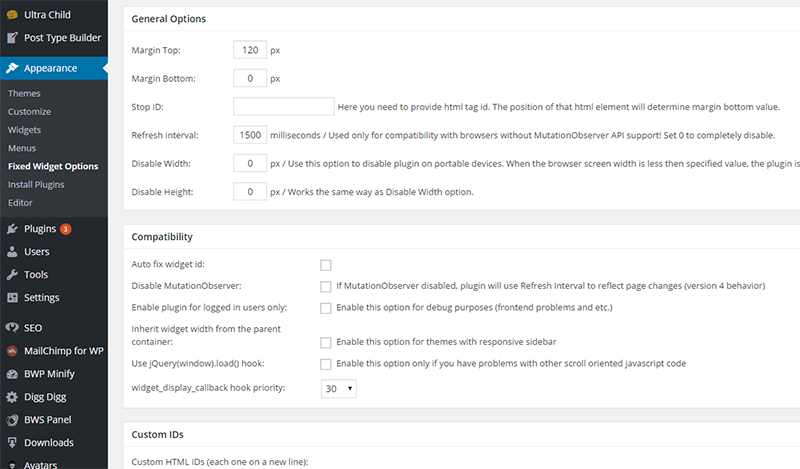
- Go to Appearance → Fixed Widget Options
- Add your footer height under Margin Bottom
This ensures the widget stops before covering important footer content.
Best Practice
To avoid layout issues, it’s recommended to:
- Make only the last sidebar widget sticky
- Avoid fixing too many widgets at once
This keeps your layout clean and user-friendly.
2. Theia Sticky Sidebar for WordPress (Premium)
If you want smoother behavior and advanced customization, Theia Sticky Sidebar is a powerful premium solution.
What Makes It Different?
Unlike many sticky plugins, Theia:
- Works smoothly even if your sidebar is taller than the screen
- Prevents jumpy or broken scroll behavior
- Supports multiple sidebars
- Provides clean admin controls
Key Features
- Smooth, fluid scrolling
- Compatible with most themes
- Support for multiple sidebars
- Advanced spacing controls
- Mobile support
- Professional support included
How to Configure
After installation:
- Go to Settings → Theia Sticky Sidebar
- Configure sidebar behavior
- Use “Add another sidebar” if needed
It works out-of-the-box for most WordPress themes, requiring minimal adjustments.

Free vs Premium: Which Should You Choose?
| Feature | Q2W3 Fixed Widget | Theia Sticky Sidebar |
|---|---|---|
| Price | Free | Premium |
| Ease of Use | Very Simple | Simple |
| Smooth Scroll | Basic | Advanced |
| Multiple Sidebars | Yes | Yes |
| Footer Protection | Manual Setting | Built-in Handling |
| Support | Community | Premium Support |
If you want a quick free solution → choose Q2W3
If you want smoother performance and flexibility → choose Theia Sticky Sidebar
Final Thoughts
Adding a sticky widget or floating sidebar in WordPress is one of the easiest ways to improve engagement and conversions.
Whether you use the free Q2W3 Fixed Widget plugin or the premium Theia Sticky Sidebar, both solutions make it easy to:
- Keep CTAs visible
- Increase email signups
- Improve ad performance
- Boost overall user engagement
Start with the free option — and upgrade if you need advanced behavior.
Disclaimer: This post may include affiliate links. If you click one of them, we may receive a small commission at no extra cost to you. Thank you for your support.